BLE, CAN and UART share the vehicle integration layer. Choose the physical interface in Settings; choose the package integration on the Bike page.
Bluetooth to the bike
BLE is available by default. The Bike picker prioritizes recognizable names without excluding other VESC Nordic UART Service devices. Select the device, complete any pairing prompt, and wait for main-controller discovery and fresh telemetry.
The saved association includes the verified BLE peer and selected integration. Bluetooth bonds are separate from that association. If an upstream device changes its pairing credentials, retry pairing with the new PIN rather than changing the bike lock PIN.
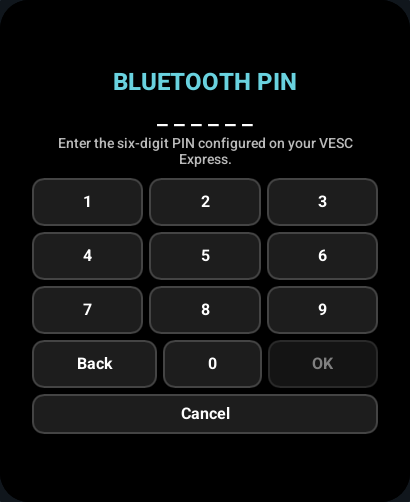
This pairing preview uses a simulated browser service; it does not establish radio interoperability.
Finding the main controller
For BLE, the display sends the standard VESC CAN ping command, then queries firmware and package telemetry for the direct controller and CAN candidates. Native CAN performs CAN ping and firmware queries on the bus. A BMS is not selected as a motor controller.
The first compatible motor controller with a supported custom package installed is selected automatically. With Auto (the default), discovery probes both WFB and wheel-e packages and uses a verified reply, independently of the BLE name. A manual package selection requires that package to respond. No controller-choice prompt is required. Auto falls back to read-only standard VESC telemetry only when no supported package is found; generic VESC can also be selected explicitly.
Discovery is read-only. Tuning and lock requests wait until the route, connection generation and required telemetry are valid. Discovery repeats after the connection changes; old queued work is not replayed onto another controller.
Native CAN
The ESP32-S3 has a TWAI controller but needs an external CAN transceiver. Use the board schematic and the transceiver's electrical requirements when choosing GPIOs and wiring. The display's CAN identity must be unique on the bus.
The firmware exposes CAN in Settings > Vehicle connection only when both CAN_TX and CAN_RX are defined in that target's PlatformIO build flags. Defaults are 500 kbit/s and display node ID 254. The target motor-controller ID is discovered, not hard-coded into a bike command.
UART
UART appears only when both UART_TX and UART_RX are configured for the target. Match the vehicle's UART baud setting; the default is 115200. Vehicle UART defaults to port 1; port 0 remains reserved for the console.
Use compatible logic levels, cross TX/RX as required, and share a signal ground. GPIO assignments are target configuration, not a setting that can be guessed from the screen model. See building.
Connect a phone through the display
- Enable Settings > VESC BLE proxy. It is off by default.
- Find the display in your phone app using its BLE name, initially
WB Disp. - If a bike lock PIN is configured, pair using that six-digit PIN. The upstream device's pairing PIN is not reused.
- In the phone app, perform its normal VESC discovery and choose the controller you want to use.
- Disconnect the phone when you want the display to resume its own polling or configuration.
The proxy supports the selected BLE, UART or CAN interface. BLE and UART preserve the underlying VESC byte stream. CAN exposes a generic adapter with firmware discovery, CAN ping and explicit CAN forwarding; the phone supplies the destination CAN ID. The proxy does not use the display's main-controller route.
The advertised name belongs to this display. Changing vehicle integration or connecting to a differently named BLE module does not rename it. Edit Settings > BLE name when you want a different name.
Pairing and changed PINs
An encrypted upstream BLE connection has its own PIN prompt and saved bond. The local bike PIN determines the proxy's BLE pairing requirement. Changing or removing the bike PIN invalidates the old phone security sessions and bonds, so reconnect or re-pair the phone afterward.
PIN pairing and physical CAN/UART behavior still require acceptance testing with the intended controller and phone. See open work for the remaining hardware checks.