The main screens keep the ride information close and the configuration controls deliberate. The same interface works at 0°, 90°, 180° and 270°. Tap Settings > Orientation to advance through those angles; the selection is saved across restarts.
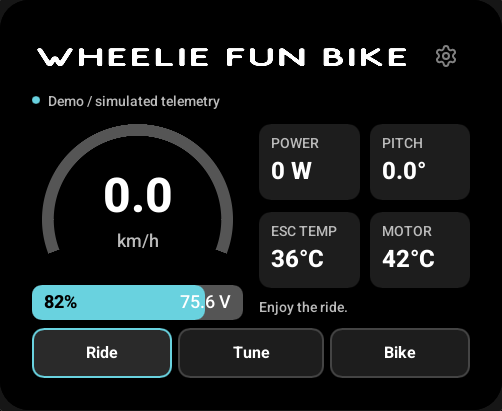
Ride
Speed uses your saved km/h or mph preference. Temperature units are configured separately. Pitch is shown with the degree symbol. The dashboard uses the selected integration's live VESC data; it does not calculate a substitute speed when messages are missing.
Connection setup and data freshness are separate. A Bluetooth or wired link can be established before valid telemetry arrives. Readings become -- when they expire, and configuration controls stay unavailable until their requirements are met.
Tune
WFB offers Eco, Cruise and Sport ride-response presets plus speed-limit controls. Select a draft, tap Apply, review the confirmation and apply the change while the bike is stopped. The firmware checks connection identity, freshness, speed and controller fault again before enqueueing the command.
A queued tuning command is not a readback. The current protocol does not document an acknowledgement for these writes. Selecting a preset in the UI does not prove it is the bike's stored preset.
Wheel-e and generic VESC do not show WFB-only tuning controls. Use VESC Tool for configuration that this display does not expose.
Bike
Leave the integration at Auto (the default) to detect a supported package through controller probes. Choose a specific integration to require that package. Disconnect or forget the bike to change the selection. The main-controller discovery status explains which controller the display is using; Find main controller again reruns the read-only discovery process when the link is available.
Lock controls and the locked-screen timeout also live here. Unsupported package features are not enabled by selecting a different page.
Settings
The cog is always in the upper-right header. The Settings list scrolls vertically.
| Setting | Behavior |
|---|---|
| Orientation | Rotates the interface and touch mapping together. |
| Speed units | Switches km/h and mph. |
| Temperature units | Switches °C and °F independently of speed units. |
| Brightness | Sets the brightness restored after waking the locked display. |
| Vehicle connection | Selects BLE, CAN or UART when wired interfaces are configured for the target. |
| BLE name | Changes this display's own advertised name; default WB Disp. |
| VESC BLE proxy | Enables the phone connection; off by default. |
| Wi-Fi | Scans, connects, forgets a network or enters a hidden SSID. |
| Firmware updates | Checks and installs a matching GitHub release image. |
| About | Shows version, board identity and live diagnostics. |
Touch and gestures
Horizontal swipes change the three primary pages and follow your finger. Short or reversed drags snap back. Vertical motion scrolls Tune and Bike content rather than changing pages. Moving pages do not accept accidental Apply or device-selection taps.
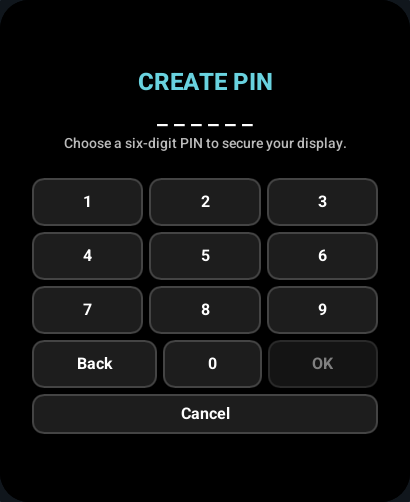
The layout keeps content inside the panel's rounded corners. Changing orientation cancels a held gesture; lift your finger before starting another touch. The keyboard and PIN entry also respect the safe area.
When a phone is connected
The phone owns the VESC conversation while it is connected to the proxy. The display suspends its own queries, configuration writes and firmware maintenance. Recognized replies may update the dashboard passively; other readings become stale. Disconnect the phone to return the conversation to the display.
The phone chooses its own CAN controller. The proxy never substitutes the display's selected main controller. See connections.